Backend
Flask Tutorials
# <a href="https://www.teachcloud.dev/backend/framework-studio/flask"> Learn Flask with Python — From Beginner to Practical...

Master Flask, Django, FastAPI and the patterns that separate hobby projects from production-grade systems. Real code. Real trade-offs. Real architecture.
Each Python web framework has its own sweet spot. We cover all three so you can pick the right tool — and understand why you picked it.
The minimalist powerhouse. Flask hands you the building blocks and stays out of your way. Perfect for APIs, microservices, and developers who want total control over their stack.
Modern, blazing-fast, and self-documenting. FastAPI combines Python type hints with async/await to deliver APIs that are both developer-friendly and production-ready.
The Swiss Army knife of Python web development. Django's "batteries included" philosophy gives you an ORM, admin panel, auth, and more — right out of the box.
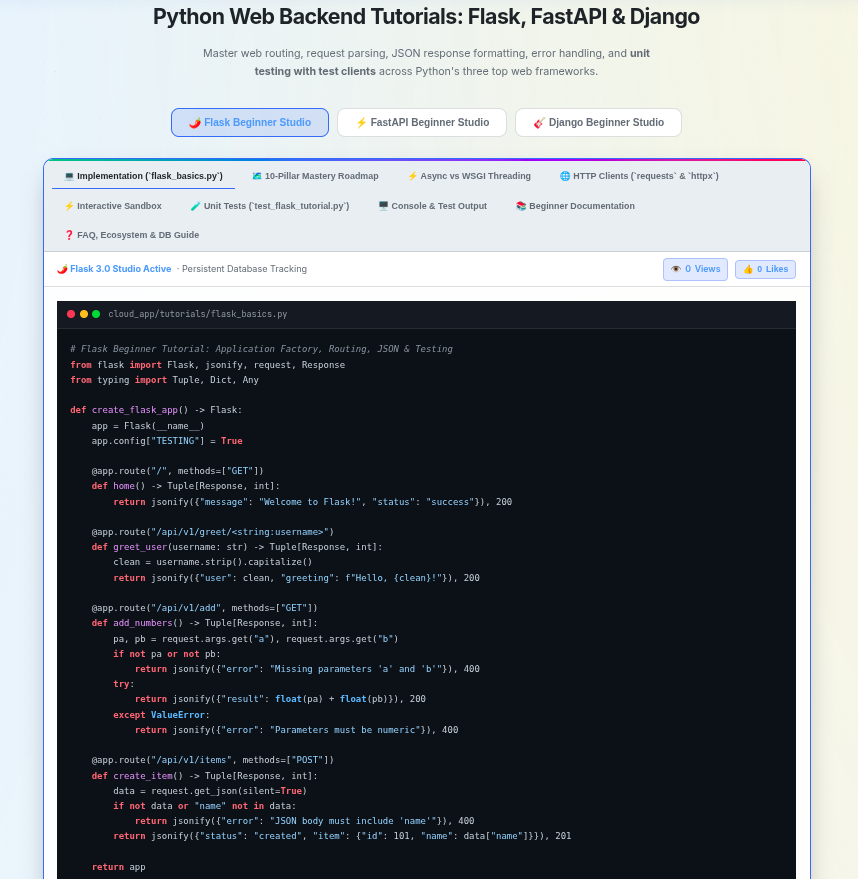
Master web routing, request parsing, JSON response formatting, error handling, and unit testing with test clients across Python's three top web frameworks.
# Flask Beginner Tutorial: Application Factory, Routing, JSON & Testing
from flask import Flask, jsonify, request, Response
from typing import Tuple, Dict, Any

def create_flask_app() -> Flask:
    app = Flask(__name__)
    app.config["TESTING"] = True

    @app.route("/", methods=["GET"])
    def home() -> Tuple[Response, int]:
        return jsonify({"message": "Welcome to Flask!", "status": "success"}), 200

    @app.route("/api/v1/greet/<string:username>")
    def greet_user(username: str) -> Tuple[Response, int]:
        clean = username.strip().capitalize()
        return jsonify({"user": clean, "greeting": f"Hello, {clean}!"}), 200

    @app.route("/api/v1/add", methods=["GET"])
    def add_numbers() -> Tuple[Response, int]:
        pa, pb = request.args.get("a"), request.args.get("b")
        if not pa or not pb:
            return jsonify({"error": "Missing parameters 'a' and 'b'"}), 400
        try:
            return jsonify({"result": float(pa) + float(pb)}), 200
        except ValueError:
            return jsonify({"error": "Parameters must be numeric"}), 400

    @app.route("/api/v1/items", methods=["POST"])
    def create_item() -> Tuple[Response, int]:
        data = request.get_json(silent=True)
        if not data or "name" not in data:
            return jsonify({"error": "JSON body must include 'name'"}), 400
        return jsonify({"status": "created", "item": {"id": 101, "name": data["name"]}}), 201

return appA complete, structured pathway covering Application instances, Routes, Blueprints, Templates, Forms, Sessions, Authentication, REST APIs, Extensions, and Production WSGI deployment.
Click "⚡ Run Pillar Code" to execute interactive test.
Click "▶️ Run Flask Test Script" to execute tests.
import unittest
from cloud_app.tutorials.flask_basics import create_flask_app

class TestFlaskTutorial(unittest.TestCase):
    def setUp(self):
        self.app = create_flask_app()
        self.client = self.app.test_client()

    def test_01_home_endpoint_success(self):
        response = self.client.get("/")
        self.assertEqual(response.status_code, 200)
        self.assertEqual(response.get_json()["status"], "success")

    def test_02_greet_user_path_parameter(self):
        response = self.client.get("/api/v1/greet/monika")
        self.assertEqual(response.status_code, 200)
        self.assertEqual(response.get_json()["user"], "Monika")

    def test_03_add_numbers_query_parameters(self):
        response = self.client.get("/api/v1/add?a=12.5&b=7.5")
        self.assertEqual(response.status_code, 200)
        self.assertEqual(response.get_json()["result"], 20.0)

    def test_04_create_item_post_success(self):
        response = self.client.post("/api/v1/items", json={"name": "Flask Guide"})
        self.assertEqual(response.status_code, 201)
        self.assertEqual(response.get_json()["status"], "created")

if __name__ == "__main__":
unittest.main()tests/test_flask_tutorial.py::TestFlaskTutorial::test_01_home_endpoint_success PASSED [ 12%] tests/test_flask_tutorial.py::TestFlaskTutorial::test_02_greet_user_path_parameter PASSED [ 25%] tests/test_flask_tutorial.py::TestFlaskTutorial::test_03_add_numbers_query_parameters PASSED [ 37%] tests/test_flask_tutorial.py::TestFlaskTutorial::test_04_add_numbers_missing_parameter_error PASSED [ 50%] tests/test_flask_tutorial.py::TestFlaskTutorial::test_05_add_numbers_invalid_type_error PASSED [ 62%] tests/test_flask_tutorial.py::TestFlaskTutorial::test_06_create_item_post_success PASSED [ 75%] tests/test_flask_tutorial.py::TestFlaskTutorial::test_07_create_item_post_missing_name_error PASSED [ 87%] tests/test_flask_tutorial.py::TestFlaskTutorial::test_08_404_not_found_handler PASSED [100%] ============================== 8 passed in 0.18s ==============================
Flask is a lightweight, WSGI-compliant micro-framework. Below is the complete step-by-step design process from virtual environment creation to app initialization, local database connection, and local testing.
Connect Flask to a local SQLite database (or local PostgreSQL/MySQL) using SQLAlchemy ORM:
Essential technical questions covering Application Factory, Contexts, Blueprints, Security, Forms, and REST APIs.
Flask-SQLAlchemy, Flask-WTF, Flask-CORS).
current_app, g) and Request Context (request, session)?
current_app and g (thread-safe request-scoped storage).request (headers, query params, POST body) and session (signed cookie storage).app instance, code is split into domain modules (e.g., auth_bp, api_bp, dashboard_bp) with custom URL prefixes (e.g., /auth, /api/v1).
create_app()) work and why is it best practice?
def create_app(config_class):). This prevents global state mutation, enables dynamic configuration switching (e.g., TestingConfig using in-memory SQLite vs ProductionConfig using PostgreSQL), and allows multiple app instances during automated testing.
SECRET_KEY mandatory?
SECRET_KEY. Clients can read session cookie content, but cannot modify keys or values without invalidating the signature.
Flask-WTF handle form validation and CSRF protection?
Flask-WTF integrates WTForms with Flask. It automatically generates and validates unique CSRF tokens rendered in forms via {{ form.csrf_token }}. Calling form.validate_on_submit() checks if the HTTP request is a POST submission, verifies the CSRF token, and executes input validation rules.
Flask-Login and werkzeug.security?
Flask-Login manages user authentication sessions (logging in, logging out, remembering user sessions via cookies). Models inherit from UserMixin and implement a user_loader callback. Passwords are securely hashed with generate_password_hash() and verified using check_password_hash().
jsonify({"key": "value"}), 200. Production REST APIs utilize Flask-Smorest or Flask-RESTful paired with Marshmallow for automatic request data validation, serialization, and Swagger/OpenAPI interactive doc generation.
Flask-SQLAlchemy and Flask-Migrate integrate?
ext.init_app(app). Flask-SQLAlchemy provides declarative ORM models and query builders, while Flask-Migrate wraps Alembic to track model changes and generate CLI schema migrations (flask db migrate, flask db upgrade).
gunicorn --workers 4 --bind 127.0.0.1:5000 "run:create_app()").
The standard third-party package stack used in production Flask applications.
| Library Name | Category | Pip Installation Command & Purpose |
|---|---|---|
| Flask-SQLAlchemy | ORM | pip install flask-sqlalchemySQLAlchemy ORM integration for Flask with automatic context handling and query builder. |
| Flask-Migrate | Migrations | pip install flask-migrateSQLAlchemy database schema migrations via Alembic wrapper. |
| Flask-WTF / WTForms | Forms | pip install flask-wtf wtformsForm validation, CSRF token protection, and field rendering. |
| Flask-Login | Auth | pip install flask-loginUser session management, login/logout state, and @login_required guard. |
| Flask-CORS | Security | pip install flask-corsCross-Origin Resource Sharing headers handling for single-page web applications. |
| Flask-Smorest / Marshmallow | REST API | pip install flask-smorest marshmallowREST API framework with OpenAPI schema validation and Swagger UI docs. |
| Flask-Caching | Cache | pip install flask-caching redisResponse & view caching using Redis, Memcached, or in-memory backends. |
| gunicorn | WSGI Server | pip install gunicornPre-fork WSGI HTTP worker server for production Flask application deployment. |
Detailed setup guide, driver installation commands, and configuration snippets for top Flask databases.
Default database for Flask development. Embedded serverless file database built directly into Python. Zero setup overhead.
# 1. Driver included in Python stdlib (sqlite3)
# 2. Configure app.config in Flask:
import os
basedir = os.path.abspath(os.path.dirname(__file__))

app.config['SQLALCHEMY_DATABASE_URI'] = 'sqlite:///' + os.path.join(basedir, 'instance', 'app.db')
app.config['SQLALCHEMY_TRACK_MODIFICATIONS'] = FalseThe standard for production Flask applications. ACID compliant, high concurrency, and native JSON support with SQLAlchemy.
# 1. Install psycopg2 driver
pip install psycopg2-binary flask-sqlalchemy

# 2. Configure app.config in Flask:
app.config['SQLALCHEMY_DATABASE_URI'] = 'postgresql://username:secret_pass@localhost:5432/flask_db'
app.config['SQLALCHEMY_TRACK_MODIFICATIONS'] = FalsePopular relational database engine connected via PyMySQL driver with SQLAlchemy.
# 1. Install PyMySQL driver
pip install pymysql flask-sqlalchemy

# 2. Configure app.config in Flask:
app.config['SQLALCHEMY_DATABASE_URI'] = 'mysql+pymysql://admin:secret_pass@localhost:3306/flask_db'
app.config['SQLALCHEMY_TRACK_MODIFICATIONS'] = FalseDocument NoSQL database for unstructured JSON document stores and flexible schemas.
# 1. Install Flask-PyMongo driver
pip install flask-pymongo pymongo

# 2. Configure app.config & initialize:
from flask_pymongo import PyMongo

app.config['MONGO_URI'] = 'mongodb://localhost:27017/flask_db'
mongo = PyMongo(app)
In-memory cache and server-side session store using Flask-Caching or Flask-Session.
# 1. Install Redis drivers
pip install redis flask-caching flask-session

# 2. Configure app.config in Flask:
app.config['SESSION_TYPE'] = 'redis'
app.config['SESSION_REDIS'] = redis.from_url('redis://localhost:6379/0')
app.config['CACHE_TYPE'] = 'RedisCache'PostgreSQL wire-compatible distributed cloud SQL database for multi-region serverless applications.
# 1. Install CockroachDB driver adapter
pip install psycopg2-binary sqlalchemy-cockroachdb

# 2. Configure app.config in Flask:
app.config['SQLALCHEMY_DATABASE_URI'] = 'cockroachdb://user:pass@localhost:26257/flask_db'
app.config['SQLALCHEMY_TRACK_MODIFICATIONS'] = False
Flask is natively a WSGI (Web Server Gateway Interface) framework. Instead of a single event loop, Flask achieves concurrency by assigning each incoming HTTP request to an isolated OS worker thread or process via Gunicorn. Since Flask 2.0+, you can also write async def route handlers powered by asgiref.
Gunicorn spins up multiple worker processes & threads. Each request occupies 1 dedicated thread until response completion.
gunicorn --workers 4 --threads 2 app:app
Flask automatically installs asgiref to execute async def view functions inside temporary thread event loops.
@app.route('/api') async def api(): ...
Ideal for calling multiple external microservices concurrently using httpx.AsyncClient inside a single Flask request handler.
res = await client.get('https://...')import httpx
import asyncio
from flask import Flask, jsonify
app = Flask(__name__)
# Flask 2.0+ native async def route
@app.route("/fetch-external-data")
async def fetch_external_data():
async with httpx.AsyncClient() as client:
# Query 2 external microservices concurrently inside Flask!
res_users, res_posts = await asyncio.gather(
client.get("https://api.teachcloud.dev/v1/users"),
client.get("https://api.teachcloud.dev/v1/posts")
)
return jsonify({
"status": "success",
"users_status": res_users.status_code,
"posts_status": res_posts.status_code
})
if __name__ == "__main__":
app.run(debug=True)requests) & Flask 2.0 Async (httpx)
Flask microservices frequently call external REST APIs. Learn how to perform synchronous requests in WSGI routes using requests.get() and non-blocking asynchronous requests in Flask 2.0 async def routes using httpx.AsyncClient.
# 1. Traditional WSGI Synchronous Route using `requests`
import requests
from flask import Flask, jsonify, request

app = Flask(__name__)

@app.route("/api/exchange-rate", methods=["GET"])
def get_exchange_rate():
    base_currency = request.args.get("base", "USD")
    url = f"https://api.exchangerate-api.com/v4/latest/{base_currency}"

    try:
        res = requests.get(url, timeout=4.0)
        res.raise_for_status()
        return jsonify(res.json()), 200
    except requests.RequestException:
        return jsonify({"error": "Exchange rate service unavailable"}), 503

# 2. Modern Flask 2.0 Async Route using `httpx.AsyncClient`
import httpx
import asyncio

@app.route("/api/fanout-services")
async def fanout_services():
    async with httpx.AsyncClient(timeout=5.0) as client:
return jsonify({"github_status": r1.status_code, "httpbin_status": r2.status_code})Standardized backend security education covering password hashing, JWT/OAuth2, secure session cookies, CSRF/CORS defenses, SQLi/XSS prevention, environment secrets, and secure account recovery workflows in Flask.
Plain text & fast hashes (MD5, SHA-256) are vulnerable to GPU brute-forcing. Flask uses PBKDF2-SHA256 via werkzeug.security or Argon2id / bcrypt via argon2-cffi and Flask-Bcrypt with work factor salts.
from werkzeug.security import (
    generate_password_hash, check_password_hash
)
pw_hash = generate_password_hash("Secret123!", method="pbkdf2:sha256")
is_valid = check_password_hash(pw_hash, "Secret123!")
Flask signed client-side cookies use SECRET_KEY. Enforce HttpOnly (prevents XSS theft), Secure (HTTPS only), and SameSite=Lax/Strict (prevents CSRF).
app.config["SESSION_COOKIE_HTTPONLY"] = True
app.config["SESSION_COOKIE_SECURE"] = True
app.config["SESSION_COOKIE_SAMESITE"] = "Lax"
Stateless authorization via JSON Web Tokens (Header.Payload.Signature). Short-lived access tokens (15m) paired with long-lived refresh tokens. Integrated with PyJWT or Flask-JWT-Extended.
import jwt, datetime
payload = {"sub": user_id, "exp": datetime.datetime.utcnow() + datetime.timedelta(minutes=15)}
token = jwt.encode(payload, SECRET_KEY, algorithm="HS256")
AuthN verifies identity ("Who are you?"). AuthZ verifies permissions ("What can you do?"). Use Flask-Login (@login_required) & custom RBAC decorators.
from functools import wraps
def roles_required(role):
    def decorator(f):
        @wraps(f)
        def wrapper(*args, **kwargs):
            if current_user.role != role: abort(403)
            return f(*args, **kwargs)
        return wrapper
    return decorator
Prevent unauthorized form submissions using Flask-WTF Synchronizer Tokens (CSRFProtect). Configure Cross-Origin HTTP requests safely with flask_cors.CORS.
from flask_wtf import CSRFProtect
from flask_cors import CORS
csrf = CSRFProtect(app)
CORS(app, origins=["https://teachcloud.dev"])
Always use parameterized queries via Flask-SQLAlchemy ORM. Jinja2 templates auto-escape HTML variables to block Cross-Site Scripting (XSS).
# Safe ORM Parameterized Query
user = User.query.filter_by(username=user_input).first()
# Jinja2 Auto-Escaping in HTML: {{ user_input }}
Never hardcode API keys, database credentials, or secret keys in version control. Load from .env files using python-dotenv or os.environ.
import os
from dotenv import load_dotenv
load_dotenv()
SECRET_KEY = os.environ.get("SECRET_KEY", "fallback-dev-key")
Enforce TLS 1.3 with HSTS headers. Generate single-use timed tokens with itsdangerous.URLSafeTimedSerializer for secure password reset links & email verification.
from itsdangerous import URLSafeTimedSerializer
serializer = URLSafeTimedSerializer(app.config["SECRET_KEY"])
token = serializer.dumps(user.email, salt="password-reset-salt")
email = serializer.loads(token, salt="password-reset-salt", max_age=1800)from flask import Flask, request, jsonify, session
from werkzeug.security import generate_password_hash, check_password_hash
from flask_wtf.csrf import CSRFProtect
from flask_cors import CORS
import os, datetime, jwt
app = Flask(__name__)
app.config["SECRET_KEY"] = os.environ.get("SECRET_KEY", "prod-super-secret-key-2026")
app.config["SESSION_COOKIE_HTTPONLY"] = True
app.config["SESSION_COOKIE_SECURE"] = True
app.config["SESSION_COOKIE_SAMESITE"] = "Lax"
csrf = CSRFProtect(app)
CORS(app, origins=["https://teachcloud.dev"])
# In-memory user database mockup
USERS_DB = {}
@app.route("/api/register", methods=["POST"])
def register():
data = request.get_json()
email = data.get("email")
password = data.get("password")
if not email or not password:
return jsonify({"error": "Email and password required"}), 400
# 1. Password Hashing (Salted PBKDF2 / Bcrypt)
hashed_pw = generate_password_hash(password, method="pbkdf2:sha256", salt_length=16)
USERS_DB[email] = {"email": email, "password": hashed_pw, "is_verified": False}
return jsonify({"message": "User registered successfully", "status": 201}), 201
@app.route("/api/login", methods=["POST"])
def login():
data = request.get_json()
user = USERS_DB.get(data.get("email"))
# 2. Hash Verification
if not user or not check_password_hash(user["password"], data.get("password", "")):
return jsonify({"error": "Invalid credentials"}), 401
# 3. JWT Bearer Token Generation
token = jwt.encode({
"sub": user["email"],
"exp": datetime.datetime.utcnow() + datetime.timedelta(minutes=30)
}, app.config["SECRET_KEY"], algorithm="HS256")
return jsonify({"access_token": token, "token_type": "Bearer"}), 200Detailed reference breakdown of core dependencies automatically bundled with Flask, as well as essential production libraries required for ORMs, Migrations, Auth, Task Queues, and WSGI Deployment.
pip install flask)
These packages constitute the foundational engine of Flask and are automatically installed upon core installation.
The micro-framework wrapper managing application context, blueprints, and request dispatching.
from flask import Flask, request, jsonify
Handles HTTP request/response object models, routing map engine, and password hashing helpers.
from werkzeug.security import generate_password_hash
Renders HTML templates with variable interpolation, inheritance, macro definitions, and XSS auto-escaping.
from flask import render_template
Cryptographically signs data payloads for secure HTTP session cookies, password reset tokens, and timestamps.
from itsdangerous import URLSafeTimedSerializer
Powers the command-line interface (`flask run`, `flask shell`) and allows custom `@app.cli.command()` registration.
@app.cli.command("create-db")
Fast signal and event dispatching system triggering callbacks on `request_started` or `template_rendered` events.
from flask import request_started
Comprehensive reference of third-party libraries added during Flask project development.
| Library Package | Category | Pip Install Command | Role & Production Utility |
|---|---|---|---|
| Flask-SQLAlchemy | ORM | pip install Flask-SQLAlchemy |
Integrates SQLAlchemy ORM into Flask, managing DB sessions, connection pooling, and model schemas. |
| Flask-Migrate | Migrations | pip install Flask-Migrate |
Wraps Alembic to manage relational schema versioning and zero-downtime database migrations via CLI. |
| psycopg2-binary | DB Driver | pip install psycopg2-binary |
PostgreSQL database adapter allowing Flask-SQLAlchemy to communicate with PostgreSQL servers. |
| Flask-WTF | Forms & CSRF | pip install Flask-WTF |
Integrates WTForms into Flask for automated HTML form rendering, field validation, and CSRF token security. |
| Flask-Login | Auth | pip install Flask-Login |
Manages user authentication sessions, cookie storage, login state (`current_user`), and `@login_required` decorators. |
| Flask-JWT-Extended | JWT Auth | pip install Flask-JWT-Extended |
Provides stateless JSON Web Token creation, refresh token handling, and `@jwt_required()` decorators for REST APIs. |
| Flask-CORS | Security | pip install Flask-CORS |
Attaches Cross-Origin Resource Sharing (CORS) HTTP headers to enable cross-domain requests from SPA frontends. |
| Marshmallow | Serialization | pip install marshmallow flask-marshmallow |
Converts complex ORM objects to native Python datatypes and JSON payloads with strict validation rules. |
| Celery & Redis | Async Tasks | pip install celery redis |
Distributed background task queue manager for running heavy jobs asynchronously outside the WSGI thread. |
| python-dotenv | Config | pip install python-dotenv |
Loads environment secrets automatically from `.env` files into `os.environ` upon application boot. |
| Gunicorn | WSGI Server | pip install gunicorn |
Pre-fork WSGI HTTP worker server process manager for production Linux deployments behind Nginx. |
Your rating is recorded directly in the database. Average: 5.0 / 5 (1 rating)
# FastAPI Beginner Tutorial: Async Routing, Pydantic & TestClient
from fastapi import FastAPI, HTTPException, status, Query, Depends, Header
from pydantic import BaseModel, Field, EmailStr
from typing import Dict, Any, Optional, List

class ItemCreate(BaseModel):
    name: str = Field(..., min_length=2, max_length=50)
    price: float = Field(..., gt=0)
    description: Optional[str] = None

class ItemResponse(BaseModel):
    id: int
    name: str
    price: float
    description: Optional[str] = None

def create_fastapi_app() -> FastAPI:
    app = FastAPI(title="Beginner FastAPI Service", version="1.0.0")

    @app.get("/", status_code=status.HTTP_200_OK)
    async def root() -> Dict[str, str]:
        return {"message": "Welcome to FastAPI!", "status": "online"}

    @app.get("/items/{item_id}", response_model=ItemResponse)
    async def get_item(item_id: int) -> ItemResponse:
        if item_id <= 0:
            raise HTTPException(status_code=400, detail="Item ID must be positive.")
        return ItemResponse(id=item_id, name=f"Component #{item_id}", price=49.99)

    @app.post("/items", response_model=ItemResponse, status_code=status.HTTP_201_CREATED)
    async def create_item(payload: ItemCreate) -> ItemResponse:
        return ItemResponse(id=202, name=payload.name, price=payload.price, description=payload.description)

return appA complete, structured pathway covering Routes & APIRouter, Path Parameters, Query Parameters, Request Bodies, Pydantic, Dependency Injection, Auth & JWT, Async Endpoints, OpenAPI / Swagger, and Production Deployment.
Click "⚡ Run Pillar Code" to execute interactive test.
Click "▶️ Run FastAPI Test Script" to execute tests.
import unittest
from cloud_app.tutorials.fastapi_basics import create_fastapi_app, get_fastapi_test_client

class TestFastAPITutorial(unittest.TestCase):
    def setUp(self):
        self.app = create_fastapi_app()
        self.client = get_fastapi_test_client(self.app)

    def test_01_root_endpoint_success(self):
        response = self.client.get("/")
        self.assertEqual(response.status_code, 200)
        self.assertEqual(response.json()["status"], "online")

    def test_02_get_item_by_id_success(self):
        response = self.client.get("/items/10")
        self.assertEqual(response.status_code, 200)
        self.assertEqual(response.json()["id"], 10)

    def test_03_create_item_pydantic_validation_success(self):
        payload = {"name": "Async Service", "price": 49.95}
        response = self.client.post("/items", json=payload)
        self.assertEqual(response.status_code, 201)
        self.assertEqual(response.json()["name"], "Async Service")

    def test_04_create_item_pydantic_validation_error(self):
        payload = {"name": "A", "price": -10.0}  # Invalid schema
        response = self.client.post("/items", json=payload)
        self.assertEqual(response.status_code, 422)

if __name__ == "__main__":
unittest.main()tests/test_fastapi_tutorial.py::TestFastAPITutorial::test_01_root_endpoint_success PASSED [ 14%] tests/test_fastapi_tutorial.py::TestFastAPITutorial::test_02_get_item_by_id_success PASSED [ 28%] tests/test_fastapi_tutorial.py::TestFastAPITutorial::test_03_get_item_invalid_id_error PASSED [ 42%] tests/test_fastapi_tutorial.py::TestFastAPITutorial::test_04_get_item_not_found_error PASSED [ 57%] tests/test_fastapi_tutorial.py::TestFastAPITutorial::test_05_multiply_query_parameters_success PASSED [ 71%] tests/test_fastapi_tutorial.py::TestFastAPITutorial::test_06_create_item_pydantic_validation_success PASSED [ 85%] tests/test_fastapi_tutorial.py::TestFastAPITutorial::test_07_create_item_pydantic_validation_error PASSED [100%] ============================== 7 passed in 0.15s ==============================
FastAPI is an asynchronous, high-performance web framework based on Python type hints and ASGI. Below is the complete step-by-step design process from environment creation to Pydantic schemas, database connections, and local testing.
Technical questions covering ASGI, Pydantic, Path/Query Params, Dependencies, OAuth2, Async, and OpenAPI.
asyncio coroutines.
@app.get('/items/{item_id}')). FastAPI automatically validates types (e.g., item_id: int) and returns HTTP 422 if mismatched.def read(skip: int = 0, limit: int = 10)) are automatically parsed from request query strings (/items?skip=0&limit=10).BaseModel, FastAPI automatically parses incoming JSON, validates field types, applies constraint rules (e.g. gt=0, min_length=3), generates OpenAPI JSON schemas, and converts valid data directly into Python objects.
Depends) work?
Depends() allows declaring reusable logic (e.g., database session yields, user auth token verification, query filters) as parameter dependencies in path operation functions. FastAPI automatically resolves the dependency graph, executes prerequisite callables, manages resource lifecycles (closing DB connections), and injects return values into endpoints.
OAuth2PasswordBearer scheme paired with passlib[bcrypt] for password hashing and PyJWT for token creation. The /token endpoint verifies user credentials and returns a signed HMAC-SHA256 JWT access token. Protected endpoints extract the token via current_user: User = Depends(get_current_user).
async def and synchronous def route handlers in FastAPI?
async def: Executed directly on the main event loop. Must use non-blocking async libraries (e.g., httpx, asyncpg, aiosqlite) with await keyword.def: FastAPI automatically runs standard synchronous routes in a background thread pool (via anyio external worker pool) to avoid blocking the main asyncio event loop./docs (allowing live API request testing in browser) and ReDoc documentation at /redoc automatically with zero manual YAML configuration.
create_async_engine() and AsyncSession. DB sessions are provided to routes via an async generator dependency:
async def get_db():
    async with AsyncSessionLocal() as session:
yield sessionCORSMiddleware handles cross-origin browser headers, while TrustedHostMiddleware guards against HTTP Host Header attacks. BackgroundTasks allows deferring execution of heavy tasks (e.g. sending confirmation emails) after returning the HTTP response to the client.
The standard third-party package stack used in production FastAPI applications.
| Library Name | Category | Pip Installation Command & Purpose |
|---|---|---|
| fastapi | Framework | pip install fastapiHigh-performance ASGI micro-framework built on Starlette and Pydantic. |
| uvicorn[standard] | ASGI Server | pip install "uvicorn[standard]"Lightning-fast ASGI web server implementation powered by uvloop and httptools. |
| pydantic | Validation | pip install pydantic[email]Data validation, schema enforcement, and JSON serialization using Python type hints. |
| sqlalchemy (v2.0) | Async ORM | pip install sqlalchemySQL Toolkit and Object Relational Mapper with native AsyncSession support. |
| asyncpg / aiosqlite | Async Driver | pip install asyncpg aiosqliteHigh-speed asynchronous database drivers for PostgreSQL and SQLite. |
| PyJWT / passlib | Auth | pip install pyjwt "passlib[bcrypt]"JSON Web Token signing and bcrypt password hash verification. |
| httpx | Testing | pip install httpxNext-generation async HTTP client required for TestClient unit testing. |
| alembic | Migrations | pip install alembicLightweight database migration tool for SQLAlchemy ORM models. |
Detailed setup guide, async driver installation commands, and connection code snippets for FastAPI databases.
The premier choice for production FastAPI applications. High-performance asynchronous non-blocking binary protocol connected via asyncpg driver.
# 1. Install asyncpg and SQLAlchemy 2.0
pip install asyncpg sqlalchemy

# 2. Configure AsyncEngine in database.py:
from sqlalchemy.ext.asyncio import create_async_engine, AsyncSession

DATABASE_URL = "postgresql+asyncpg://admin:pass@localhost:5432/fastapi_db"
engine = create_async_engine(DATABASE_URL, echo=False)
Default database for local FastAPI testing. Embedded file-based database driven by aiosqlite async wrapper. Zero installation overhead.
# 1. Install aiosqlite driver
pip install aiosqlite sqlalchemy

# 2. Configure AsyncEngine in database.py:
from sqlalchemy.ext.asyncio import create_async_engine

DATABASE_URL = "sqlite+aiosqlite:///./test_fastapi.db"
engine = create_async_engine(DATABASE_URL, echo=True)
Popular relational database connected asynchronously via aiomysql driver.
# 1. Install aiomysql driver
pip install aiomysql sqlalchemy

# 2. Configure AsyncEngine in database.py:
DATABASE_URL = "mysql+aiomysql://admin:pass@localhost:3306/fastapi_db"
engine = create_async_engine(DATABASE_URL, echo=False)Asynchronous Document NoSQL engine paired with Motor driver and Beanie Pydantic ODM.
# 1. Install Motor & Beanie async ODM
pip install motor beanie pydantic

# 2. Initialize in FastAPI lifespan startup event:
from motor.motor_asyncio import AsyncIOMotorClient
from beanie import init_beanie

client = AsyncIOMotorClient("mongodb://localhost:27017")
await init_beanie(database=client.fastapi_db, document_models=[UserDocument])High-performance async in-memory key-value cache, session store, and request rate limiter.
# 1. Install redis-py driver
pip install redis

# 2. Async Redis Client in FastAPI:
import redis.asyncio as redis

r = redis.from_url("redis://localhost:6379", decode_responses=True)
await r.set("user_101_session", "active", ex=3600)Distributed multi-region SQL database compatible with PostgreSQL protocol and asyncpg.
# 1. Install asyncpg & sqlalchemy-cockroachdb
pip install asyncpg sqlalchemy-cockroachdb

# 2. Configure AsyncEngine:
DATABASE_URL = "cockroachdb+asyncpg://user:pass@free-tier.cockroachlabs.cloud:26257/defaultdb"
engine = create_async_engine(DATABASE_URL, echo=False)FastAPI is built natively on top of Starlette and the ASGI (Asynchronous Server Gateway Interface) specification. Master how Python's single-threaded event loop processes thousands of concurrent HTTP requests without thread blocking.
| Feature / Dimension | ⚡ FastAPI | 🎸 Django (v4.2+) | 🌶️ Flask (v2.0+) |
|---|---|---|---|
| Server Interface | ASGI Native (Starlette) | Hybrid (ASGI & WSGI) | WSGI Native (Werkzeug) |
| Concurrency Paradigm | Single-Thread Event Loop (`asyncio`) | Thread Pool + Optional ASGI Loop | OS Multi-Threading / Gunicorn Workers |
| Async Priority | Mandatory Core | Modern Upgrade | Optional Helper |
| Primary DB Driver | `asyncpg` / `aiosqlite` (Async) | `psycopg2` / `afirst()` ORM helpers | SQLAlchemy Sync / Async optional |
| Blocking Call Impact | ❌ Freezes Event Loop | ⚠️ Requires `sync_to_async` | ✅ Isolated to Worker Thread |
Click "▶️ Execute Async Code Script" to run non-blocking coroutines.
Synchronous execution blocks thread execution during I/O wait times. Asynchronous execution yields control back to the event loop while waiting for network or disk operations.
async def declares a coroutine callable. await pauses coroutine execution until an awaitable object (Promise/Task) completes, allowing other tasks to run.
The heart of asynchronous Python. Manages task scheduling, I/O multiplexing, and coroutine context switching in a single high-efficiency OS thread.
A coroutine is idle code until scheduled. asyncio.create_task() schedules a coroutine immediately onto the event loop to run concurrently in the background.
Executes multiple awaitable tasks in parallel and returns aggregated results. Reduces total latency from N * time down to max(time).
Using synchronous `requests` inside FastAPI blocks the event loop. Replace it with httpx.AsyncClient() for fully asynchronous HTTP requests.
Use non-blocking async DB drivers like asyncpg or aiosqlite with SQLAlchemy 2.0 AsyncSession to handle database concurrency efficiently.
Never use time.sleep(), synchronous file reads (open()), or blocking network calls inside async def endpoints. Use `run_in_executor` for CPU-heavy tasks.
requests vs. httpx for External API Integration
Modern web applications consume external APIs (Stripe, OpenAI, Auth0, GitHub) and microservices. Learn how to perform synchronous and non-blocking asynchronous HTTP requests with GET/POST verbs, custom headers, bearer auth, defensive timeouts, and robust error handling.
| Feature / Metric | requests (Synchronous) | httpx (Sync + Async Native) |
|---|---|---|
| Execution Paradigm | Synchronous (Blocking I/O) | Dual: Sync + Async (async/await) |
| FastAPI Integration | ⚠️ Blocks Event Loop inside `async def` | ✅ Non-blocking inside `async def` views |
| Connection Pooling | requests.Session() |
httpx.AsyncClient() |
| HTTP/2 Support | No (HTTP/1.1 only) | Yes (via http2=True) |
import httpx
from fastapi import FastAPI, HTTPException

app = FastAPI()

@app.get("/github/user/{username}")
async def get_github_profile(username: str):
    url = f"https://api.github.com/users/{username}"
    headers = {"User-Agent": "FastAPI-App/1.0", "Accept": "application/json"}

    # Non-blocking async client with defensive timeout
    async with httpx.AsyncClient(timeout=5.0) as client:
        try:
            res = await client.get(url, headers=headers)
            res.raise_for_status() # Raises HTTPStatusError for 4xx/5xx
            data = res.json()
            return {
                "username": data.get("login"),
                "public_repos": data.get("public_repos"),
                "followers": data.get("followers")
            }
        except httpx.HTTPStatusError as exc:
            raise HTTPException(status_code=exc.response.status_code, detail="External API error")
        except httpx.RequestError:
raise HTTPException(status_code=504, detail="External API timed out")Standardized FastAPI security education: Passlib/Argon2/bcrypt password hashing, OAuth2 Password Bearer with JWT tokens, Dependency Injection security guards, Security Scopes, CORSMiddleware, Pydantic SQLi/XSS sanitization, and async token lifecycle management.
Use passlib.context.CryptContext with bcrypt or argon2-cffi. Fast hashes (MD5, SHA256) fail OWASP criteria. Passlib manages automatic salt generation and work-factor migrations.
from passlib.context import CryptContext
pwd_context = CryptContext(schemes=["bcrypt", "argon2"], deprecated="auto")
hashed_pw = pwd_context.hash("SecretPassword123")
is_valid = pwd_context.verify("SecretPassword123", hashed_pw)
Set refresh tokens or session state via response.set_cookie() with httponly=True, secure=True, and samesite="lax" to protect against XSS token harvesting & CSRF exploits.
response.set_cookie(
    key="refresh_token", value=refresh_jwt,
    httponly=True, secure=True, samesite="lax", max_age=604800
)
FastAPI features built-in OpenAPI interactive docs support for OAuth2PasswordBearer(tokenUrl="token"). Decoded via PyJWT or python-jose.
from fastapi.security import OAuth2PasswordBearer
oauth2_scheme = OAuth2PasswordBearer(tokenUrl="token")
async def get_current_user(token: str = Depends(oauth2_scheme)):
    payload = jwt.decode(token, SECRET_KEY, algorithms=["HS256"])
    return payload
Differentiate AuthN (identity verification) from AuthZ (access rights). FastAPI uses Security(get_current_user, scopes=["items:write"]) to validate permissions at endpoint declaration.
from fastapi.security import Security, SecurityScopes
@app.get("/admin/dashboard")
async def admin_dashboard(user: User = Security(get_current_user, scopes=["admin"])):
    return {"status": "authorized"}
Pure REST APIs using HTTP Authorization: Bearer headers are immune to browser CSRF. Configure CORSMiddleware with explicit allowed origins & HTTP methods.
from fastapi.middleware.cors import CORSMiddleware
app.add_middleware(
    CORSMiddleware, allow_origins=["https://teachcloud.dev"],
    allow_credentials=True, allow_methods=["*"], allow_headers=["*"]
)Async ORMs (SQLAlchemy 2.0 / Tortoise ORM) enforce parameterized query strings. Pydantic v2 schemas sanitize and validate input types, preventing malformed payloads.
# Async Parameterized SQLAlchemy Query
stmt = select(User).where(User.email == user_email)
result = await session.execute(stmt)
Manage production environment variables securely via pydantic-settings. Ensures all required secrets (JWT secret, DB URL) exist on application startup.
from pydantic_settings import BaseSettings
class Settings(BaseSettings):
    secret_key: str
    database_url: str
    class Config: env_file = ".env"
settings = Settings()
Force TLS 1.3 termination. Issue time-scoped JWT tokens for password resets (scope="reset_password"). Deliver verification links asynchronously via BackgroundTasks.
@app.post("/password-reset-request")
async def reset_request(email: str, bg_tasks: BackgroundTasks):
    token = create_reset_token(email)
    bg_tasks.add_task(send_reset_email, email=email, token=token)
return {"message": "If email exists, reset link was sent."}from fastapi import FastAPI, Depends, HTTPException, status
from fastapi.security import OAuth2PasswordBearer, OAuth2PasswordRequestForm
from passlib.context import CryptContext
from pydantic import BaseModel, EmailStr
import jwt, datetime, os
app = FastAPI(title="FastAPI Production Security Service")
oauth2_scheme = OAuth2PasswordBearer(tokenUrl="token")
pwd_context = CryptContext(schemes=["bcrypt"], deprecated="auto")
SECRET_KEY = os.getenv("SECRET_KEY", "fastapi-production-secret-key-2026")
class UserRegister(BaseModel):
email: EmailStr
password: str
USERS_DB = {}
@app.post("/token")
async def login_for_access_token(form_data: OAuth2PasswordRequestForm = Depends()):
user = USERS_DB.get(form_data.username)
if not user or not pwd_context.verify(form_data.password, user["hashed_password"]):
raise HTTPException(
status_code=status.HTTP_401_UNAUTHORIZED,
detail="Incorrect username or password",
headers={"WWW-Authenticate": "Bearer"},
)
access_token_expires = datetime.timedelta(minutes=30)
expire = datetime.datetime.utcnow() + access_token_expires
token = jwt.encode({"sub": user["email"], "exp": expire}, SECRET_KEY, algorithm="HS256")
return {"access_token": token, "token_type": "bearer"}
@app.get("/users/me")
async def read_users_me(token: str = Depends(oauth2_scheme)):
try:
payload = jwt.decode(token, SECRET_KEY, algorithms=["HS256"])
email: str = payload.get("sub")
if email is None: raise HTTPException(status_code=401)
return {"email": email, "status": "authenticated"}
except jwt.PyJWTError:
raise HTTPException(status_code=401, detail="Invalid token")Comprehensive guide to Starlette, Pydantic, Uvicorn, Async ORMs, JWT drivers, and high-performance Rust/C accelerators utilized in production FastAPI microservices.
pip install fastapi)
Essential underlying libraries powering FastAPI's ASGI routing, data validation, and server dispatching.
High-performance microservice framework orchestrating OpenAPI docs, dependency injection, and router dispatching.
from fastapi import FastAPI, Depends, HTTPException
Lightweight ASGI framework handling request routing, WebSockets, background tasks, and CORS middleware.
from starlette.responses import JSONResponse
Rust-backed data validation and serialization library deriving OpenAPI schemas directly from type hints.
from pydantic import BaseModel, Field, EmailStr
Lightning-fast ASGI web server implementation powered by `uvloop` (libuv C bindings) and `httptools` HTTP parser.
uvicorn main:app --reload --port 8000
Loads and type-checks environment configuration variables (`.env`) with automatic type coercion.
from pydantic_settings import BaseSettings
Streaming HTTP multipart parser required by FastAPI for accepting `Form()` data and `UploadFile` uploads.
from fastapi import Form, File, UploadFile
Third-party packages used across production-grade FastAPI microservices.
| Library Package | Category | Pip Install Command | Role & Production Utility |
|---|---|---|---|
| SQLAlchemy (v2.0) | Async ORM | pip install "sqlalchemy[asyncio]" |
Next-generation ORM supporting `AsyncSession` coroutines for non-blocking database queries. |
| asyncpg | Async Postgres | pip install asyncpg |
Ultra-fast binary protocol asynchronous PostgreSQL driver written in Cython for high query throughput. |
| aiosqlite | Async SQLite | pip install aiosqlite |
Asynchronous driver wrapper for local SQLite database integration in dev/testing environments. |
| alembic | Migrations | pip install alembic |
Database schema migration engine tracking changes to async SQLAlchemy models over time. |
| PyJWT & passlib | Auth | pip install pyjwt "passlib[bcrypt]" |
Encodes/decodes JSON Web Tokens and verifies bcrypt password hashes for `OAuth2PasswordBearer` flows. |
| httpx | HTTP Client | pip install httpx |
Asynchronous HTTP client (`AsyncClient`) powering external API calls and FastAPI unit testing via `TestClient`. |
| orjson | Rust JSON | pip install orjson |
Rust-based JSON library yielding up to 6x faster serialization speeds than standard Python `json` (`ORJSONResponse`). |
| redis.asyncio | Cache & PubSub | pip install redis |
Non-blocking Redis client for API caching, WebSocket pub/sub broadcasting, and rate-limiting storage. |
| Gunicorn & Uvicorn | Deployment | pip install gunicorn uvicorn |
Production process manager executing Uvicorn worker instances (`gunicorn -k uvicorn.workers.UvicornWorker`). |
Your feedback rating is saved directly to the database. Average: 5.0 / 5 (1 rating)
# Django Beginner Tutorial: Views, Request Dispatching & JsonResponse
import json
from typing import Dict, Any

class JsonResponse:
    def __init__(self, data: Dict[str, Any], status: int = 200):
        self.data = data
        self.status_code = status

    def json(self) -> Dict[str, Any]:
        return self.data

def index_view(request) -> JsonResponse:
    if request.method != "GET":
        return JsonResponse({"error": "Method Not Allowed"}, status=405)
    return JsonResponse({"message": "Welcome to Django!", "status": "success"}, status=200)

def user_profile_view(request, user_id: int) -> JsonResponse:
    if user_id <= 0:
        return JsonResponse({"error": "Invalid User ID"}, status=400)
    return JsonResponse({"user_id": user_id, "username": f"django_dev_{user_id}"}, status=200)

def create_article_view(request) -> JsonResponse:
    if request.method != "POST":
        return JsonResponse({"error": "Method Not Allowed"}, status=405)
    data = json.loads(request.body) if request.body else {}
    if "title" not in data:
        return JsonResponse({"error": "Title is required"}, status=400)
return JsonResponse({"status": "created", "article": {"id": 501, "title": data["title"]}}, status=201)A complete, structured pathway from empty project directory to high-availability deployment. Master these 14 core concepts to build enterprise-grade Django applications.
Click "⚡ Run Pillar Code" to execute this pillar and view terminal output.
The root workspace container generated by django-admin startproject.
Controls global settings, WSGI/ASGI configurations, and environment secrets.
Self-contained modules generated with python manage.py startapp. Encourages
clean separation of domain concerns (e.g. accounts, billing, catalog).
URL routing dispatchers mapping HTTP paths to Python view callables. Supports path
converters (<int:user_id>) and modular include() routes.
Request handlers accepting HttpRequest objects and returning
HttpResponse or JsonResponse (FBVs & CBVs).
The Django Template Language (DTL) rendering dynamic HTML via inheritance
({% extends %}), tags
({% for %}), and custom filters.
Python classes representing database tables. Uses declarative field types like
CharField, ForeignKey, and DateTimeField.
Powerful database abstraction for querying without writing raw SQL. Supports chainable
lazy QuerySets, filter(), and optimized joins.
Automated data cleaning, HTML input generation, and security validation via
forms.Form and forms.ModelForm.
Built-in secure user authentication system (PBKDF2 password hashing, session management,
permissions, and @login_required).
Lightweight plugin framework for inspecting or altering requests and responses globally (e.g. CSRF check, Session injection, Security headers).
Automatic, production-ready CMS generated directly from database models via
admin.site.register() for non-technical staff management.
Extending Django into headless API backends using Django REST Framework (DRF Serializers, ViewSets, and JWT Authentication).
Built-in defenses against OWASP Top 10 vulnerabilities: SQL Injection (parameterized ORM), XSS (auto-escaped templates), CSRF tokens, and Clickjacking protection.
Transitioning from runserver to production-grade WSGI/ASGI application
servers (Gunicorn, uWSGI) behind Nginx reverse-proxies.
Click "▶️ Run Django Test Script" to execute tests.
import unittest
from cloud_app.tutorials.django_basics import (
    SimulatedHttpRequest, index_view, user_profile_view, create_article_view
)

class TestDjangoTutorial(unittest.TestCase):
    def test_01_index_view_success(self):
        req = SimulatedHttpRequest(method="GET")
        res = index_view(req)
        self.assertEqual(res.status_code, 200)
        self.assertEqual(res.json()["status"], "success")

    def test_03_user_profile_view_success(self):
        req = SimulatedHttpRequest(method="GET")
        res = user_profile_view(req, user_id=15)
        self.assertEqual(res.status_code, 200)
        self.assertEqual(res.json()["user_id"], 15)

    def test_07_create_article_view_post_success(self):
        payload = '{"title": "Django MVT"}'
        req = SimulatedHttpRequest(method="POST", body=payload)
        res = create_article_view(req)
        self.assertEqual(res.status_code, 201)

if __name__ == "__main__":
unittest.main()tests/test_django_tutorial.py::TestDjangoTutorial::test_01_index_view_success PASSED [ 12%] tests/test_django_tutorial.py::TestDjangoTutorial::test_02_index_view_invalid_method PASSED [ 25%] tests/test_django_tutorial.py::TestDjangoTutorial::test_03_user_profile_view_success PASSED [ 37%] tests/test_django_tutorial.py::TestDjangoTutorial::test_04_user_profile_view_invalid_id PASSED [ 50%] tests/test_django_tutorial.py::TestDjangoTutorial::test_05_calculate_tax_view_success PASSED [ 62%] tests/test_django_tutorial.py::TestDjangoTutorial::test_06_calculate_tax_view_missing_param PASSED [ 75%] tests/test_django_tutorial.py::TestDjangoTutorial::test_07_create_article_view_post_success PASSED [ 87%] tests/test_django_tutorial.py::TestDjangoTutorial::test_08_create_article_view_missing_title PASSED [100%] ============================== 8 passed in 0.17s ==============================
settings.py Customization
Complete step-by-step installation pipeline, database setup, and production configuration reference.
settings.py Customization Guide
Below is a fully customized, annotated myproject/settings.py file showcasing secret
management, multi-database support (SQLite/PostgreSQL), static/media storage, CORS, and Django
REST Framework configuration:
import os
from pathlib import Path

# Build paths inside the project like this: BASE_DIR / 'subdir'.
BASE_DIR = Path(__file__).resolve().parent.parent

# SECURITY: Keep secret key hidden in production using environment variables
SECRET_KEY = os.environ.get('SECRET_KEY', 'django-insecure-custom-dev-secret-key-12345')

# SECURITY: Don't run with debug turned on in production!
DEBUG = os.environ.get('DEBUG', 'True') == 'True'

ALLOWED_HOSTS = ['127.0.0.1', 'localhost', '.teachcloud.dev']

# Application definition: Register built-in, 3rd party, and local apps
INSTALLED_APPS = [
    'django.contrib.admin',
    'django.contrib.auth',
    'django.contrib.contenttypes',
    'django.contrib.sessions',
    'django.contrib.messages',
    'django.contrib.staticfiles',
    # Third-party Ecosystem Packages
    'rest_framework',
    'corsheaders',
    # Local Project Apps
    'core',
]

MIDDLEWARE = [
    'django.middleware.security.SecurityMiddleware',
    'whitenoise.middleware.WhiteNoiseMiddleware', # Serve static files directly
    'corsheaders.middleware.CorsMiddleware', # Cross-Origin HTTP Requests
    'django.contrib.sessions.middleware.SessionMiddleware',
    'django.middleware.common.CommonMiddleware',
    'django.middleware.csrf.CsrfViewMiddleware', # CSRF Protection
    'django.contrib.auth.middleware.AuthenticationMiddleware',
    'django.contrib.messages.middleware.MessageMiddleware',
    'django.middleware.clickjacking.XFrameOptionsMiddleware',
]

ROOT_URLCONF = 'myproject.urls'

TEMPLATES = [
    {
        'BACKEND': 'django.template.backends.django.DjangoTemplates',
        'DIRS': [BASE_DIR / 'templates'],
        'APP_DIRS': True,
        'OPTIONS': {
            'context_processors': [
                'django.template.context_processors.debug',
                'django.template.context_processors.request',
                'django.contrib.auth.context_processors.auth',
                'django.contrib.messages.context_processors.messages',
            ],
        },
    },
]

# Database Configuration (PostgreSQL for Prod, SQLite for Dev)
if os.environ.get('DATABASE_URL'):
    # Production PostgreSQL setup
    import dj_database_url
    DATABASES = {'default': dj_database_url.config(conn_max_age=600)}
else:
    # Local Development SQLite setup
    DATABASES = {
        'default': {
            'ENGINE': 'django.db.backends.sqlite3',
            'NAME': BASE_DIR / 'db.sqlite3',
        }
    }

# Internationalization & Timezone
LANGUAGE_CODE = 'en-us'
TIME_ZONE = 'UTC'
USE_I18N = True
USE_TZ = True

# Static & Media Files Storage
STATIC_URL = '/static/'
STATIC_ROOT = BASE_DIR / 'staticfiles'
MEDIA_URL = '/media/'
MEDIA_ROOT = BASE_DIR / 'media'

# Django REST Framework Configuration
REST_FRAMEWORK = {
    'DEFAULT_AUTHENTICATION_CLASSES': [
        'rest_framework.authentication.SessionAuthentication',
    ],
    'DEFAULT_PERMISSION_CLASSES': [
        'rest_framework.permissions.IsAuthenticatedOrReadOnly',
    ],
}Key concepts, internal mechanisms, performance optimizations, and backend architecture answers.
urls.py and dispatching requests to the appropriate View.
select_related() and
prefetch_related() in Django ORM?
select_related(): Performs an SQL INNER JOIN or
LEFT OUTER JOIN in a single query. Used for single-valued
relationships (ForeignKey, OneToOneField).
prefetch_related(): Executes separate SQL queries for each table
and joins the results in Python memory. Used for multi-valued relationships
(ManyToManyField, reverse ForeignKey).{% csrf_token %} renders a hidden input field. For
AJAX/API calls, the token is passed via X-CSRFToken HTTP header.
CsrfViewMiddleware validates this token on every unsafe HTTP request (POST,
PUT, PATCH, DELETE).
makemigrations and migrate
in Django?
makemigrations inspects changes made to your models.py and
generates Python migration blueprint files inside app/migrations/.migrate executes pending migration blueprints against the actual target SQL
database and logs progress in the django_migrations table.
post_save or pre_delete) allow decoupled apps
to execute callbacks when actions occur. They should be avoided when logic can be
explicitly called inside model save() or serializer methods, because
signals make debugging, tracing, and unit testing harder.
ListView, DetailView,
CreateView) leverage Python object-oriented inheritance and built-in mixins
to promote DRY (Don't Repeat Yourself) code reuse.
async/await),
WebSockets, and real-time streaming with Django Channels.
objects = PublishedArticleManager()) allows
encapsulating query logic directly on the model layer (e.g.
Article.objects.published()), keeping controllers and views clean and
consistent across the codebase.
X-Frame-Options, PBKDF2/Bcrypt password hashing, and CSRF token
verification.
The standard third-party package stack used in production Django applications.
| Library Name | Category | Primary Purpose & Explanation |
|---|---|---|
| djangorestframework (DRF) | REST API | Serializers, ViewSets, API authentication (JWT/Token), throttling, and OpenAPI docs for building RESTful microservices. |
| celery + django-celery-results | Async Tasks | Distributed background task queues (sending emails, image processing, heavy batch calculations) running via Redis or RabbitMQ. |
| django-cors-headers | Security | Middleware for handling Cross-Origin Resource Sharing (CORS) headers, enabling SPA frontend integration (React, Vue, Next.js). |
| django-allauth | Auth & OAuth | Complete authentication suite supporting social OAuth2 logins (Google, GitHub, Apple), email verification, and MFA. |
| pillow | Media | Python Imaging Library required for handling
Django ImageField uploads, thumbnail generation, and image
processing. |
| psycopg2-binary / psycopg3 | Database Driver | High-performance PostgreSQL database connector and driver for Django ORM. |
| django-environ / python-dotenv | Config | 12-Factor app environment configuration parser
for loading secrets securely from .env files. |
| channels + daphne | WebSockets | Extends Django to handle asynchronous protocols like WebSockets, real-time chat, and live push notifications. |
| pytest-django | Testing | Pytest test runner integration providing test
fixtures (db, client, rf) for fast
automated testing. |
| whitenoise | Static Assets | Allows web applications to serve their own static assets directly from Gunicorn/WSGI without needing Nginx. |
Official database backends and third-party relational & NoSQL rankings.
The primary & recommended database for Django. Supports
Django-specific features like native JSONField,
ArrayField, HStore, RangeFields, and full-text search.
# 1. Install psycopg2 driver
pip install psycopg2-binary

# 2. Configure settings.py
DATABASES = {
    'default': {
        'ENGINE': 'django.db.backends.postgresql',
        'NAME': 'my_django_db',
        'USER': 'postgres_user',
        'PASSWORD': 'secret_password',
        'HOST': 'localhost',
        'PORT': '5432',
    }
}Built into Python out-of-the-box with zero configuration. Ideal for local development, fast unit testing suites, and low-traffic static or edge sites.
# 1. No pip install required (Python stdlib)

# 2. Default settings.py
DATABASES = {
    'default': {
        'ENGINE': 'django.db.backends.sqlite3',
        'NAME': BASE_DIR / 'db.sqlite3',
    }
}Highly popular open-source relational database. Fully supported by Django ORM when configured with the InnoDB storage engine for transactions.
# 1. Install mysqlclient driver
pip install mysqlclient

# 2. Configure settings.py
DATABASES = {
    'default': {
        'ENGINE': 'django.db.backends.mysql',
        'NAME': 'my_django_db',
        'USER': 'mysql_user',
        'PASSWORD': 'secret_password',
        'HOST': 'localhost',
        'PORT': '3306',
        'OPTIONS': {'init_command': "SET sql_mode='STRICT_TRANS_TABLES'"},
    }
}PostgreSQL-wire compatible distributed SQL database providing automated horizontal scaling, global replication, and high fault tolerance.
# 1. Install CockroachDB backend adapter
pip install django-cockroachdb psycopg2-binary

# 2. Configure settings.py
DATABASES = {
    'default': {
        'ENGINE': 'django_cockroachdb',
        'NAME': 'bank_db',
        'USER': 'maxroach',
        'HOST': 'localhost',
        'PORT': '26257',
    }
}
Officially supported core Django database backend
(django.db.backends.oracle). Primarily utilized in large corporate
legacy systems.
# 1. Install Oracle Thin Driver
pip install oracledb

# 2. Configure settings.py
DATABASES = {
    'default': {
        'ENGINE': 'django.db.backends.oracle',
        'NAME': 'orclpdb',
        'USER': 'c##django_user',
        'PASSWORD': 'secret_password',
        'HOST': 'localhost',
        'PORT': '1521',
    }
}
Not natively supported by core Django relational ORM, but accessible via third-party
mappers (djongo or mongoengine) for document storage.
# 1. Install Djongo SQL-to-MongoDB connector
pip install djongo pymongo

# 2. Configure settings.py
DATABASES = {
    'default': {
        'ENGINE': 'djongo',
        'NAME': 'my_mongo_db',
        'CLIENT': {
            'host': 'mongodb://localhost:27017',
        }
    }
}
Django has evolved from a purely synchronous WSGI framework into a Hybrid Async/Sync
Framework. Learn how to write async def views, execute
non-blocking QuerySets using Django's Async ORM, and deploy via ASGI using
Daphne or Uvicorn.
Native asynchronous request handlers accepting request and returning
HttpResponse without blocking thread pools.
async def view(request): return JsonResponse({})
Query the database asynchronously using afirst(), acount(),
aget(), and ainbulk() methods.
article = await Article.objects.afirst()
Safely wrap legacy synchronous code or third-party SDKs using sync_to_async and
async_to_sync.
async_val = await sync_to_async(sync_func)()import asyncio
from django.http import JsonResponse
from asgiref.sync import sync_to_async
from core.models import Article
# 1. Native Asynchronous Django View
async def async_dashboard_view(request):
# Asynchronously query database without blocking worker threads
article = await Article.objects.filter(is_published=True).afirst()
count = await Article.objects.filter(is_published=True).acount()
if not article:
return JsonResponse({"error": "No articles found"}, status=404)
# Return asynchronous HTTP response
return JsonResponse({
"status": "success",
"total_published": count,
"latest_article": {
"id": article.id,
"title": article.title
}
})
# 2. Executing Blocking Operations with sync_to_async
def legacy_blocking_file_save(data):
with open("audit.log", "a") as f:
f.write(str(data) + "\n")
async def async_audit_view(request):
# Offload blocking synchronous I/O to thread pool safely
await sync_to_async(legacy_blocking_file_save)({"event": "USER_LOGIN"})
return JsonResponse({"status": "Audited"})requests) & ASGI Async
(httpx)
In production Django applications, views and background workers (Celery) make external HTTP
requests to payment gateways, webhooks, and AI microservices. Learn how to choose between
requests (in standard sync views) and httpx.AsyncClient (in Django
4.2+ async views).
# 1. Standard Synchronous View using `requests`
import requests
from django.http import JsonResponse

def weather_view(request, city_name):
    api_key = "YOUR_OPENWEATHER_KEY"
    url = f"https://api.openweathermap.org/data/2.5/weather?q={city_name}&appid={api_key}"

    try:
        response = requests.get(url, timeout=3.0)
        response.raise_for_status()
        data = response.json()
        return JsonResponse({"city": city_name, "temp": data["main"]["temp"]})
    except requests.RequestException:
        return JsonResponse({"error": "Weather API unavailable"}, status=503)

# 2. Modern Django 4.2+ Async View using `httpx.AsyncClient`
import httpx

async def async_payment_verify_view(request, transaction_id):
    headers = {"Authorization": "Bearer secret_stripe_key"}
    url = f"https://api.stripe.com/v1/charges/{transaction_id}"

    async with httpx.AsyncClient(timeout=5.0) as client:
        try:
            res = await client.get(url, headers=headers)
            res.raise_for_status()
            return JsonResponse(res.json())
        except httpx.HTTPStatusError:
            return JsonResponse({"error": "Stripe verification failed"}, status=400)
Standardized Django security education: django.contrib.auth,
PASSWORD_HASHERS (PBKDF2/Argon2/bcrypt), CsrfViewMiddleware,
session cookies, SimpleJWT for DRF, Django Groups & Permissions, Django ORM
parameterization, and built-in password reset flows.
Django defaults to PBKDF2PasswordHasher with 600,000+ iterations. Can be
upgraded to Argon2PasswordHasher or
BCryptSHA256PasswordHasher in settings.py.
PASSWORD_HASHERS = [
    'django.contrib.auth.hashers.Argon2PasswordHasher',
    'django.contrib.auth.hashers.PBKDF2PasswordHasher',
]Server-backed sessions stored in DB/Redis. Enforce SESSION_COOKIE_HTTPONLY = True, SESSION_COOKIE_SECURE = True, and SESSION_COOKIE_SAMESITE = 'Lax'.
SESSION_COOKIE_HTTPONLY = True
SESSION_COOKIE_SECURE = True
SESSION_COOKIE_SAMESITE = 'Lax'
CSRF_COOKIE_HTTPONLY = True
In REST APIs, use djangorestframework-simplejwt. Provides
TokenObtainPairView & TokenRefreshView for pair token
management.
from rest_framework_simplejwt.views import TokenObtainPairView, TokenRefreshView
urlpatterns = [
    path('api/token/', TokenObtainPairView.as_view()),
    path('api/token/refresh/', TokenRefreshView.as_view()),
]
AuthN validates credentials via authenticate(username, password). AuthZ
evaluates permissions via user.has_perm('app.change_article') and
@permission_required.
from django.contrib.auth.decorators import login_required, permission_required

@login_required
@permission_required('blog.add_article', raise_exception=True)
def create_article(request): ...
Django includes automatic CSRF protection on POST/PUT/DELETE via
CsrfViewMiddleware and {% csrf_token %}. Use
django-cors-headers for CORS.
MIDDLEWARE = [
    'corsheaders.middleware.CorsMiddleware',
    'django.middleware.csrf.CsrfViewMiddleware',
]
CORS_ALLOWED_ORIGINS = ["https://teachcloud.dev"]
Django ORM automatically parameterizes SQL queries (e.g.
Article.objects.filter(title=user_input)). DTL templates auto-escape HTML
variables by default.
# Safe Django ORM Parameterized Query
articles = Article.objects.filter(author__username=user_input)
# HTML Rendering safely escapes: {{ article.title }}
Store SECRET_KEY, database passwords, and API keys in .env. Load
securely via django-environ or python-decouple.
import environ
env = environ.Env()
environ.Env.read_env()
SECRET_KEY = env('SECRET_KEY')
DEBUG = env.bool('DEBUG', default=False)
Enable SECURE_SSL_REDIRECT = True and SECURE_HSTS_SECONDS.
Django provides built-in PasswordResetView with cryptographic single-use
tokens.
SECURE_SSL_REDIRECT = True
SECURE_HSTS_SECONDS = 31536000
# Built-in URL: path('accounts/', include('django.contrib.auth.urls'))from django.shortcuts import render, redirect
from django.contrib.auth import authenticate, login, logout
from django.contrib.auth.models import User
from django.contrib.auth.decorators import login_required
from django.views.decorators.csrf import csrf_protect
from django.http import JsonResponse
import json
@csrf_protect
def custom_login_view(request):
if request.method == 'POST':
data = json.loads(request.body)
username = data.get('username')
password = data.get('password')
# 1. Django Credential Authentication
user = authenticate(request, username=username, password=password)
if user is not None:
login(request, user) # Sets secure session cookie
return JsonResponse({"message": "Login successful", "user": user.username})
else:
return JsonResponse({"error": "Invalid credentials"}, status=401)
@login_required
def protected_dashboard_view(request):
# 2. Authorization check
return JsonResponse({
"user": request.user.username,
"is_staff": request.user.is_staff,
"status": "access_granted"
})Detailed overview of built-in Django core modules (ORM, Admin, Auth, Forms) alongside production third-party packages (DRF, Channels, Celery, WhiteNoise, Gunicorn).
pip install django)
Django ships with a comprehensive set of built-in modules handling security, persistence, administrative UI, and session management.
Declarative database mapping, relationship management (`ForeignKey`, `ManyToManyField`), and CLI migrations (`makemigrations`, `migrate`).
from django.db import models
Automatically generated administrative management web portal for modeling CRUD operations, filtering, and user permission administration.
from django.contrib import admin
Built-in user authentication model, PBKDF2 password hashing, group permissions, and `@login_required` route decorators.
from django.contrib.auth.models import User
Asynchronous server gateway interface specification allowing Django to run async views and handle WebSockets via Channels.
from asgiref.sync import sync_to_async
Non-validating SQL parser used internally by Django ORM for formatting raw database queries and schema inspection.
import sqlparse
Industry-standard packages required when extending Django for REST APIs, real-time messaging, and high availability.
| Library Package | Category | Pip Install Command | Role & Production Utility |
|---|---|---|---|
| djangorestframework (DRF) | REST API | pip install djangorestframework |
Toolkit for building RESTful web APIs with Serializers, ViewSets, permissions, and browsable web UI. |
| django-cors-headers | Security | pip install django-cors-headers |
Django middleware managing CORS headers to allow cross-origin API calls from SPA frontends. |
| drf-spectacular | OpenAPI 3.0 | pip install drf-spectacular |
Automated OpenAPI 3.0 schema generator providing interactive Swagger UI and Redoc documentation. |
| channels & daphne | WebSockets | pip install channels daphne |
Extends Django beyond HTTP to handle WebSockets, long polling, and real-time asynchronous event loops. |
| Celery & django-celery-beat | Task Queue | pip install celery django-celery-beat |
Asynchronous task queue worker engine and database-backed cron scheduler for background processing. |
| whitenoise | Static Files | pip install whitenoise |
Allows WSGI applications to serve their own static files directly in production with compression and caching headers. |
| django-debug-toolbar | Diagnostics | pip install django-debug-toolbar |
Configurable panel displaying SQL query counts, N+1 query warnings, headers, and rendering execution times during dev. |
| django-environ | Secrets Config | pip install django-environ |
Allows Twelve-Factor App setting configuration from `.env` environment variables (`environ.Env()`). |
| Gunicorn | WSGI Server | pip install gunicorn |
Production WSGI server for deploying Django applications behind Nginx reverse proxies on Linux servers. |
Your feedback rating is saved directly to the database. Average: 5.0 / 5 (1 rating)
Master data persistence with SQLite database tutorials and build scalable architectures with REST API standards. Includes interactive Python code sandboxes, flowcharts, unit testing suites, and complete installation guides for Windows, Mac, and Linux.
Select any tutorial script below to inspect its Python source code:
"""
SQLite Connection Demonstration Module.

This script demonstrates connecting to an SQLite database, initializing a cursor,
and safely closing the database connection.

Note: Do NOT name python files 'sqlite3.py' to prevent shadowing the standard library module.
"""

import sqlite3
from typing import Optional


def connect_database(db_name: str = "mydatabase.db") -> Optional[sqlite3.Connection]:
    """Connect to SQLite database file.

    Args:
        db_name (str): Database file path or name.

    Returns:
        Optional[sqlite3.Connection]: SQLite connection object if successful.
    """
    try:
        # Establish connection to the database
        connection = sqlite3.connect(db_name)
        # Initialize cursor for executing queries
        cursor = connection.cursor()
        print(f"Successfully connected to database '{db_name}'.")

        # Close database connection
        connection.close()
        print("Database connection closed successfully.")
        return connection
    except sqlite3.Error as error:
        print(f"Error connecting to database: {error}")
        return None


def create_connection(db_name: str = "mydatabase.db"):
    """Create and return an active SQLite connection and cursor.

    Args:
        db_name (str): Database file path or name.

    Returns:
        Tuple[sqlite3.Connection, sqlite3.Cursor]: Active connection and cursor tuple.
    """
    connection = sqlite3.connect(db_name)
    cursor = connection.cursor()
    return connection, cursor


def close_connection(connection: sqlite3.Connection) -> None:
    """Safely close active SQLite connection."""
    if connection:
        connection.close()


if __name__ == "__main__":
    connect_database()
Select a preset scenario below or type custom Python database code:
Car database initialized and populated with 8 static records.
Schema: Car (Name TEXT, Model TEXT, Version REAL, Description TEXT)
Complete test suite validating table creation, query parameterization, CRUD logic, and SQL injection prevention:
import unittest
import sqlite3
from cloud_app.tutorials.sqlite_db import setup_database, read_filtered_records, read_by_user_input

class TestSQLiteDatabaseModules(unittest.TestCase):
    def setUp(self):
        self.db_path = ":memory:"
        self.conn = setup_database(self.db_path)

    def test_database_initialization(self):
        cur = self.conn.cursor()
        cur.execute("SELECT COUNT(*) FROM Car")
        count = cur.fetchone()[0]
        self.assertEqual(count, 8)

    def test_sql_injection_prevention(self):
        \"\"\"Test tautology attack payload `' OR '1'='1` is safely neutralized.\"\"\"
        malicious_name = "' OR '1'='1"
        results = read_by_user_input(malicious_name, db_path=self.db_path)
self.assertEqual(len(results), 0) # Parameterized query blocks injection!Step-by-step visual execution flowcharts for database lifecycle management, schema architecture, and parameterized security:
High-level architectural interaction between Python Web Backend, SQL Execution Pipeline, and SQLite Relational Storage:
Visual execution sequence for opening connection, initializing cursor, executing statements, committing transactions, and closing resources:
sqlite3.connect()
conn.cursor()
cur.execute(sql, params)
conn.commit() / fetchall()
conn.close()
How placeholder parameter binding (?) neutralizes malicious injection payloads like ' OR '1'='1:
"' OR '1'='1"
("SELECT ... ?", (input,))
Literal Data Value
0 Rows Returned
sqlitebrowser.org.brew install --cask db-browser-for-sqlitesudo apt update && sudo apt install sqlite3 sqlitebrowserIn-memory REST API controller implementing standard GET, POST, PUT, and DELETE HTTP endpoints (`cloud_app/tutorials/rest_basics.py`):
import json
from typing import Dict, Any, Tuple

class RESTStudioRunner:
    """In-memory REST API service controller."""
    def __init__(self):
        self.services = {
            1: {"id": 1, "name": "PostgreSQL Database Service", "category": "Database", "status": "active"},
            2: {"id": 2, "name": "Redis Cache Cluster", "category": "Caching", "status": "active"},
            3: {"id": 3, "name": "RabbitMQ Message Queue", "category": "Messaging", "status": "idle"}
        }

    def handle_request(self, method: str, path: str, payload: Dict[str, Any] = None) -> Tuple[int, Dict[str, Any]]:
        """Route HTTP method and path to handler."""
        if method == "GET" and path == "/api/v1/services":
            return 200, {"status_code": 200, "message": "OK", "count": len(self.services), "data": list(self.services.values())}

        elif method == "GET" and path.startswith("/api/v1/services/"):
            try:
                service_id = int(path.split("/")[-1])
                service = self.services.get(service_id)
                if service:
                    return 200, {"status_code": 200, "data": service}
                return 404, {"status_code": 404, "error": f"Service #{service_id} Not Found"}
            except ValueError:
                return 400, {"status_code": 400, "error": "Invalid Service ID"}

        elif method == "POST" and path == "/api/v1/services":
            if not payload or "name" not in payload:
                return 400, {"status_code": 400, "error": "Field 'name' is required"}
            new_id = max(self.services.keys(), default=0) + 1
            new_service = {
                "id": new_id,
                "name": payload["name"],
                "category": payload.get("category", "General"),
                "status": "active",
            }
            self.services[new_id] = new_service
            return 201, {
                "status_code": 201,
                "message": "Resource Created Successfully",
                "data": new_service,
            }

        elif method == "PUT" and path.startswith("/api/v1/services/"):
            service_id = int(path.split("/")[-1])
            if service_id not in self.services:
                return 404, {"status_code": 404, "error": f"Service #{service_id} Not Found"}
            if payload:
                self.services[service_id].update(payload)
            return 200, {
                "status_code": 200,
                "message": "Resource Updated Successfully",
                "data": self.services[service_id],
            }

        elif method == "DELETE" and path.startswith("/api/v1/services/"):
            service_id = int(path.split("/")[-1])
            if service_id in self.services:
                deleted = self.services.pop(service_id)
                return 200, {
                    "status_code": 200,
                    "message": "Resource Deleted Successfully",
                    "deleted_id": service_id,
                    "deleted_name": deleted["name"],
                }
            return 404, {"status_code": 404, "error": f"Service #{service_id} Not Found"}

return 400, {"status_code": 400, "error": f"Unsupported HTTP Method '{method}'"}Select a preset HTTP request or craft custom API client calls:
HTTP Status Code: 200
JSON Response: {'status_code': 200, 'message': 'OK', 'count': 3, 'data': [{'id': 1, 'name': 'PostgreSQL Database Service', 'category': 'Database', 'status': 'active'}, {'id': 2, 'name': 'Redis Cache Cluster', 'category': 'Caching', 'status': 'active'}, {'id': 3, 'name': 'RabbitMQ Message Queue', 'category': 'Messaging', 'status': 'idle'}]}
import unittest
from cloud_app.tutorials.rest_basics import RESTStudioRunner

class TestRESTTutorial(unittest.TestCase):
    def test_post_create_resource(self):
        runner = RESTStudioRunner()
        status, resp = runner.handle_request("POST", "/api/v1/services", {"name": "Kafka"})
self.assertEqual(status, 201)sudo apt update && sudo apt install curl httpiesudo snap install postmanMaster the underlying language mechanics behind Flask, FastAPI, and Django. Switch tiers to explore real production Python patterns.
Stop hardcoding environment values. Production applications use strict type annotations, immutable dataclasses, and fail-fast environment validation.
@dataclass(frozen=True)
mypy
Elevate your APIs with reusable metaprogramming. Learn how custom decorators wrap endpoints to log timing, enforce permissions, and profile query bottlenecks without modifying route logic.
functools.wraps
time.perf_counter()
Scale from dozens of requests to thousands per second. Master non-blocking event loops, asynchronous connection pools, and graceful fault tolerance across microservices.
asyncio.gather()
aiohttp.ClientTimeout
from dataclasses import dataclass
import os

@dataclass(frozen=True)
class AppConfig:
    # Strict typed settings with immutable guarantees
    db_uri: str
    secret_key: str
    debug_mode: bool = False

    @classmethod
    def from_env(cls) -> "AppConfig":
        db = os.getenv("DATABASE_URL")
        key = os.getenv("SECRET_KEY")
        if not db or not key:
            raise ValueError("DATABASE_URL and SECRET_KEY must be set!")

        return cls(
            db_uri=db,
            secret_key=key,
            debug_mode=os.getenv("DEBUG") == "1"
        )
import time
import functools
import logging
logging.basicConfig(level=logging.INFO)
def log_execution_time(action_name: str):
"""Production decorator to measure and log database/API latency."""
def decorator(func):
@functools.wraps(func)
def wrapper(*args, **kwargs):
start = time.perf_counter()
result = func(*args, **kwargs)
duration_ms = (time.perf_counter() - start) * 1000
logging.info(f"[{action_name}] took {duration_ms:.2f}ms")
return result
return wrapper
return decorator
@log_execution_time("Database User Fetch")
def fetch_user_record(user_id: int):
# Optimized query execution
time.sleep(0.04)
return {"id": user_id, "role": "cloud_engineer"}import asyncio
import aiohttp
async def fetch_service_health(session: aiohttp.ClientSession, url: str) -> dict:
"""Poll microservice health endpoint with bounded timeout."""
try:
timeout = aiohttp.ClientTimeout(total=2.0)
async with session.get(url, timeout=timeout) as resp:
return {"url": url, "status": resp.status, "ok": resp.status == 200}
except Exception as err:
return {"url": url, "status": 500, "error": str(err), "ok": False}
async def check_all_microservices(service_urls: list[str]) -> list[dict]:
"""Concurrent fan-out execution across downstream services."""
async with aiohttp.ClientSession() as session:
tasks = [fetch_service_health(session, u) for u in service_urls]
return await asyncio.gather(*tasks)git clone https://github.com/DilshadPython/cloud_flask.git
Our backend curriculum is structured around the skills that matter most in production environments — not just syntax and hello-world demos.
Every guide links theory to a real problem: how do you paginate 10 million rows without a full scan? How do you structure a FastAPI project that 10 engineers can work on simultaneously?
JWT, OAuth2, session management, CSRF protection, and role-based access control.
PostgreSQL, SQLite, query optimisation, indexing strategies, and ORM best practices.
Async/await patterns, connection pooling, caching with Redis, and profiling bottlenecks.
Unit tests, integration tests, fixtures, mocking, and CI pipelines for Python backends.
                        from fastapi import FastAPI, Depends
                        from sqlalchemy.ext.asyncio import AsyncSession

                        app = FastAPI(title="TeachCloud API")

                        @app.get("/posts/{post_id}")
                        async def get_post(
                                post_id: int,
                                db: AsyncSession = Depends(get_db),
                            ) -> PostResponse:
                            post = await db.get(
                                        Post, post_id)
                            if not post:
                                raise HTTPException(
                                    status_code=404,
                                    detail="Post not found"
                                )
                            return post
Functions, formatting, type hints, stream output, and testable code mechanics from module Print to production.
Start Print Module →Build your first REST API with Flask or FastAPI. Understand request lifecycle, middleware, and blueprints.
Model your data with SQLAlchemy or Django ORM. Write migrations, optimise queries, handle relationships.
Secure your API, write comprehensive tests, containerise with Docker, and deploy behind Nginx.
# <a href="https://www.teachcloud.dev/backend/framework-studio/flask"> Learn Flask with Python — From Beginner to Practical...
Dive into our latest tutorials or subscribe to have new backend guides delivered directly to your inbox.
TeachCloud uses essential cookies for secure login sessions, CSRF protection, and site preferences (such as Dark/Light theme). Temporary session data is automatically cleared when you close your browser.
Manages CSRF tokens, secure authentication cookies, and session integrity.
Preserves chosen color themes (Day Light, Night Dark, Midnight) and screen accents.
Session tokens and temporary caches are securely discarded on tab or browser close.